
What is FDM Printing?
FDM (Fused Deposition Modeling) is the most common form of 3D printing. A spool of solid plastic filament is fed through a heated nozzle, melted, and deposited layer by layer onto a build plate, following the exact shape of your 3D model. Each layer fuses to the one below it as it cools, gradually building up a solid, physical part from the bottom up.
How it works, step by step
- Slicing: your 3D model is mathematically cut into hundreds or thousands of thin horizontal layers.
- Printing: the printer’s nozzle melts filament and traces each layer’s outline and interior pattern (infill), one on top of the other.
- Cooling: as each layer cools, it bonds to the layer beneath it, building overall part strength.
Why FDM?
- Wide material choice: from flexible rubber-like filaments to carbon-fiber-reinforced engineering plastics.
- Cost-effective: ideal for prototypes, functional parts, and low-to-mid volume production.
- Fast turnaround: no molds or tooling required — we go straight from your file to a finished part.
Good to know
FDM parts have visible layer lines (their height is adjustable – see the Layer Height section) and are generally strongest along the print layers, somewhat weaker across them. Our team can advise on orientation for parts with specific strength requirements.
Materials
Each material has a different balance of strength, flexibility, heat resistance, and ease of printing. Here’s a quick comparison, followed by details on what each one is best suited for.
| Material | Strength | Flexibility | Heat resistance | Print difficulty | Best for |
|---|---|---|---|---|---|
| PLA | Low | Rigid | ~55°C | Easy | Prototypes, decorative items, low-stress parts |
| PETG | Medium | Semi-rigid | ~75°C | Easy | Functional parts, light mechanical use, some moisture exposure |
| ABS | Medium-High | Rigid | ~95°C | Moderate | Mechanical parts, enclosures, higher-temperature environments |
| ASA | Medium-High | Rigid | ~95°C | Moderate | Outdoor parts, UV-exposed applications |
| PC-ABS | High | Rigid | ~110°C | Advanced | Demanding structural / load-bearing parts |
| TPU 85A | Low (rigidity) | Very flexible | ~60°C | Moderate | Gaskets, phone cases, flexible hinges/joints |
| TPU 95A | Medium | Flexible | ~65°C | Moderate | Wear-resistant flexible parts, treads, semi-rigid grips |
| PAHT-CF | Very High | Rigid | ~150°C | Advanced | High-performance mechanical parts, jigs, fixtures |
| PA12-CF | High | Rigid | ~140°C | Advanced | Lightweight, strong structural parts |
| PA6-CF | Very High | Rigid | ~150°C | Advanced | Industrial, high-stress mechanical parts |
Material details
Values below are drawn from published technical data sheets for this type of material, X-Y (in-plane) print orientation, dry state. Real-world results vary by brand, print settings, and part orientation — parts are generally weaker across layers (Z) than along them (X-Y).
PLA
The easiest material to print with, and the most affordable. Great surface finish and sharp detail, but softens at relatively low temperatures and is more brittle than other options. Best for prototypes, models, and anything that won’t be under mechanical or thermal stress.
PETG
A step up from PLA in toughness and temperature resistance, while still being easy to print. Handles moisture better than PLA. A solid all-round choice for functional parts that need to hold up to everyday use.
ABS
Tougher and more heat-resistant than PLA/PETG, with good impact resistance. Can warp during printing if not handled carefully, but produces durable parts suited to mechanical applications and enclosures. A long-time favorite among engineers for functional prototypes, thanks to its familiar mechanical properties and machinability.
ASA
Very similar to ABS in strength and heat resistance, but with much better UV resistance — the material of choice for anything that will spend time outdoors or in direct sunlight, where ABS would eventually become brittle and discolored.
PC-ABS
A blend that combines the strength and heat resistance of polycarbonate with the printability of ABS. Suited to demanding, load-bearing parts where standard ABS wouldn’t be strong enough.
TPU 85A / 95A
Flexible, rubber-like materials — 85A is softer and bendier, 95A is semi-rigid and more wear-resistant. Used for anything that needs to flex, absorb impact, or grip: phone cases, gaskets, wheels, cable protectors.
85A is softer and typically slightly lower in tensile strength than 95A; exact published figures for 85A vary by brand.
PAHT-CF
High-temperature carbon-fiber-reinforced nylon, optimized for dimensional stability and strength retention even when damp. Ideal for functional prototypes, jigs, and fixtures.
PA6-CF
Carbon-fiber-reinforced Nylon 6 — the stiffest and strongest option in this family, with excellent impact resistance. More sensitive to moisture than PAHT-CF, so best suited to dry-use applications.
PA12-CF
Carbon-fiber-reinforced Nylon 12 — trades a little strength for better dimensional stability and lower moisture sensitivity than PA6-CF, making it a good choice when consistent, precise dimensions matter more than absolute peak strength.
PA12-CF figures are broader estimates – less brand-specific published data is available for this material than for PAHT-CF/PA6-CF.
What is Infill?
Infill is the internal structure printed inside your part — most FDM parts are not solid all the way through. The printer fills the inside with a repeating pattern at a percentage you choose, trading off strength, weight, material cost, and print time.
How to choose
- Lower infill – cheaper, lighter, faster to print. Good for prototypes, display pieces, and parts under little to no load.
- Higher infill – stronger and more durable, but heavier, more expensive, and slower to print. Worth it for parts that need to handle real mechanical stress.
How we pick the exact percentage
Ultra light, Light, and Solid are ranges, not single fixed numbers (up to 20%, 20-50%, and 50-80% respectively). Within the range you select, we choose the specific percentage based on your material and the part itself – its size, geometry, and how it’s likely to be used – rather than applying one flat number to every part.
Note on TPU (flexible filament): flexible materials behave differently from rigid ones. Because TPU itself is soft, low infill can make parts feel inconsistent, overly compressible, or unpredictable in how they flex. Following standard engineering practice for flexible filaments, TPU parts are printed at around 90% infill by default, regardless of which infill option is selected, to give consistent flexibility, durability, and feel.
Why we cap “Solid” at 80%, not 100%
It might seem like more infill is always better, but pushing density above roughly 80-90% for rigid materials tends to work against print quality rather than improve it. A denser infill holds more heat inside the part for longer as it cools, which increases internal stress and shrinkage – this is a well-documented cause of warping and reduced dimensional accuracy in FDM printing. Very high infill also leaves little separation between the infill and the outer walls, which can cause slight bulging, over-extrusion artifacts, or subtle changes to the part’s outer geometry, right where dimensional accuracy usually matters most. On top of that, the mechanical strength gained above ~80% infill is small compared to the extra material and print time it costs. For these reasons, we cap the “Solid” range at 80% for rigid materials – if your application genuinely needs a fully solid part, let us know and we can advise on the best approach. (TPU is the exception described above, since flexible material behaves very differently under heat and stress than rigid material does.)
Not sure which is right for your part? Pick the option that best matches how the part will actually be used, or get in touch and we’re happy to advise.
What is Layer Height?
Layer height (sometimes called “layer line”) is the thickness of each individual layer the printer lays down, measured in millimeters. It’s one of the biggest factors in how a print looks, how strong it is, and how long it takes to produce.
How to choose
- Thinner layers (0.1mm) – best for detailed models, miniatures, or anything where surface finish matters most.
- Standard (0.2mm) – our default recommendation for most parts; a good balance for everyday use.
- Thicker layers (0.3mm) – best when speed matters more than surface finish, e.g. large functional parts or quick prototypes.
Design Tips & Tolerances
A few things to keep in mind when preparing your model can make a real difference in how well it prints and how it performs.
Wall thickness
Keep walls at least 1-1.2mm thick (roughly 3-4 nozzle widths) for structural reliability. Thinner walls can be printed but may be fragile or fail to print cleanly.
Overhangs & supports
Steep overhangs (more than about 45° from vertical) generally need support material underneath, which adds cost and requires post-processing to remove. Where possible, designing parts to minimize overhangs reduces both.
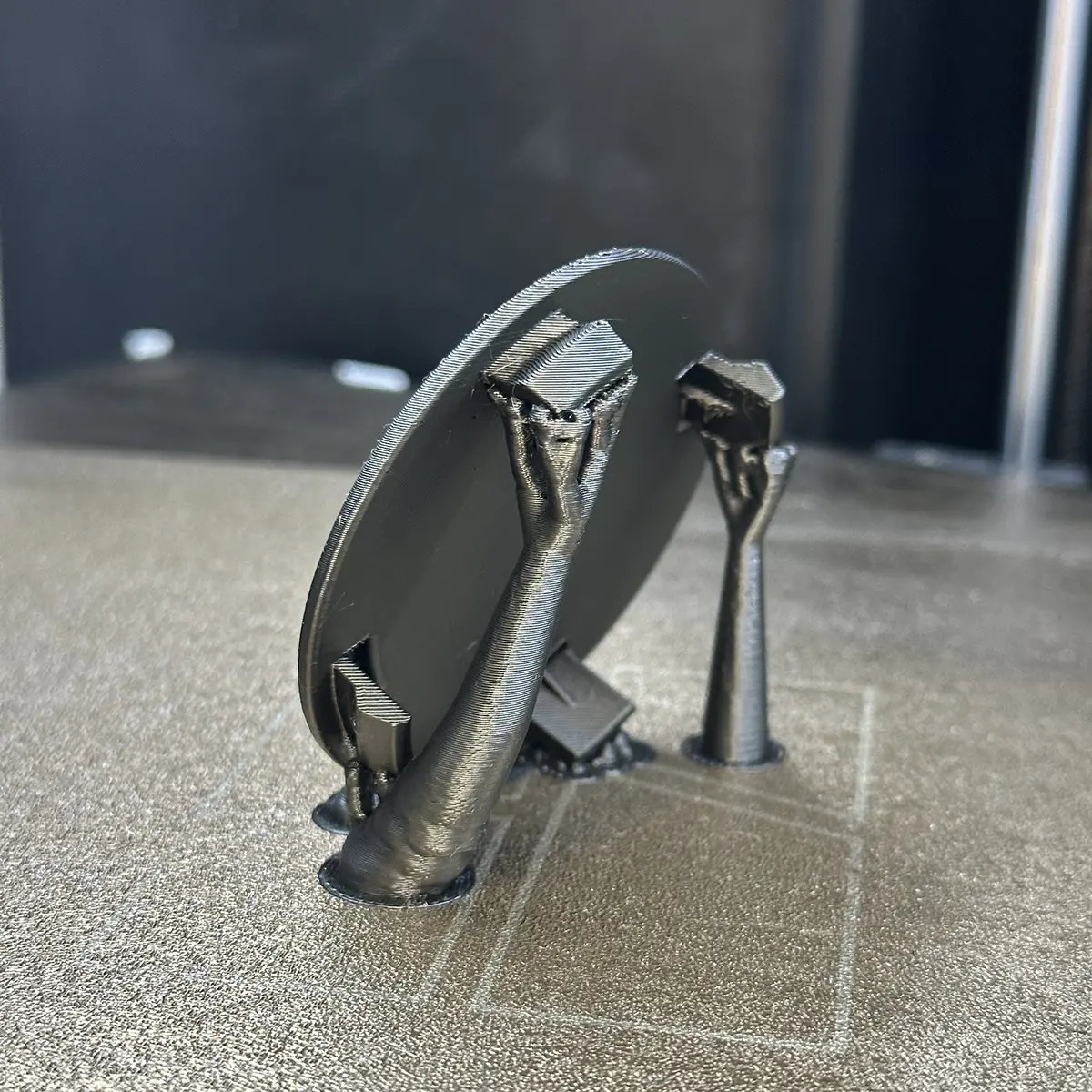 Before support removal
Support material still attached underneath an overhang.
Before support removal
Support material still attached underneath an overhang.
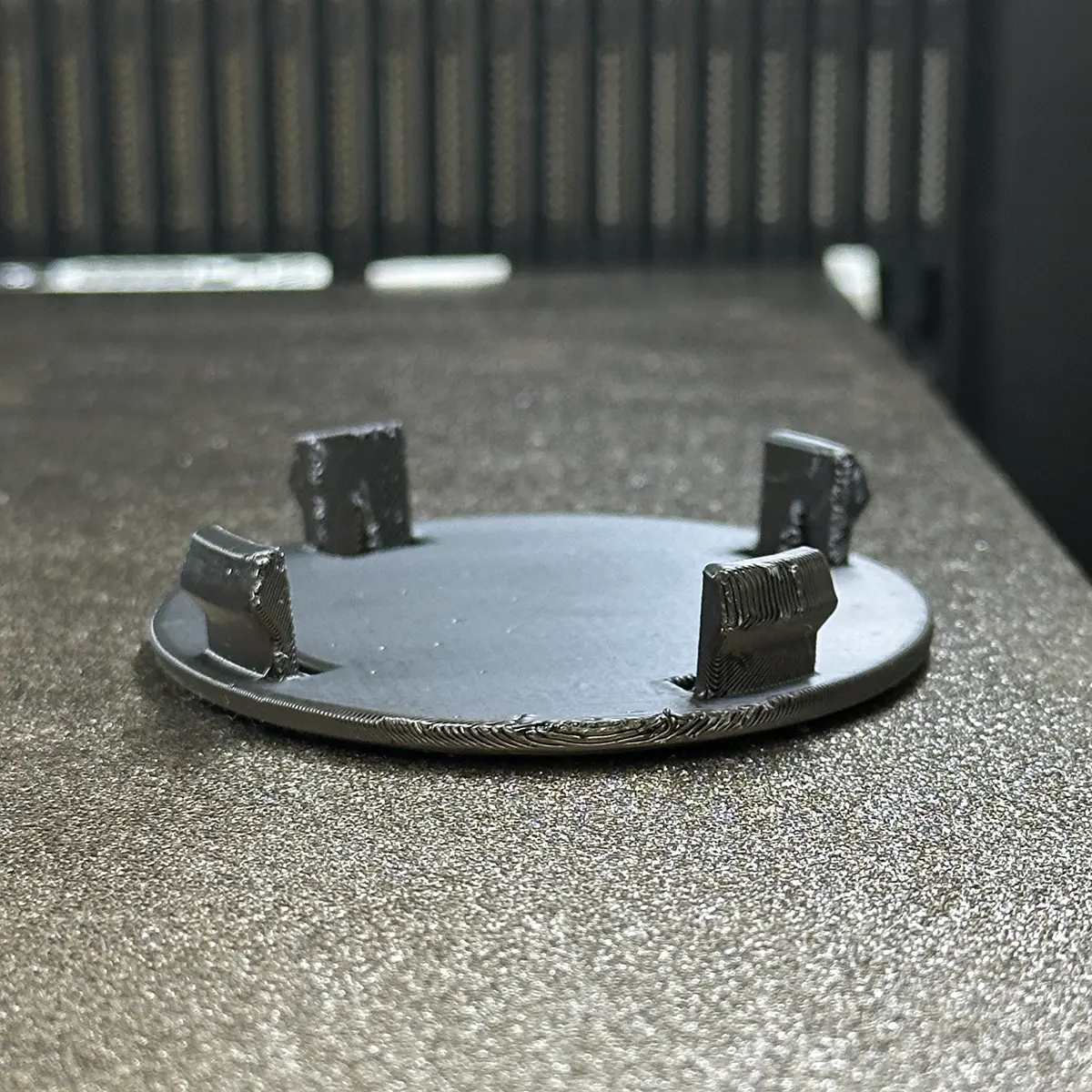 After removal
Slightly textured surface where supports were removed — normal and expected.
After removal
Slightly textured surface where supports were removed — normal and expected.
Dimensional accuracy
FDM printing is not a precision process like CNC machining – typical achievable tolerance is around ±0.2mm to ±0.5mm, depending on part size, geometry, material, and orientation. Larger parts and features further from the print bed tend to sit toward the wider end of that range. If your application needs tighter tolerances than this, let us know before ordering so we can advise on whether FDM is the right fit, or whether extra machining/finishing is needed.
Tolerances for fitting parts
If your part needs to fit together with another (e.g. a lid, a shaft, an assembly), we recommend a clearance of at least 0.2-0.3mm per side for a snug fit, or 0.4mm+ for an easy sliding fit. Let us know in the comments field if your part has specific fit requirements.
Minimum feature size
Fine details (text, thin fins, small holes) below about 0.8-1mm may not reproduce reliably. If your design has small features that are critical, flag them in your order comments so we can double-check before printing.
Where to Find 3D Model Files
Don’t have your own STL file? No problem – there are large communities of designers who share free and paid 3D-printable models online. Here are some of the most popular places to look:
MakerWorld – makerworld.com
A large, fast-growing model-sharing platform with a big catalog of ready-to-print designs, many optimized specifically for FDM printing.
Printables – printables.com
One of the largest 3D printing communities, with a huge range of free models, from practical household items to detailed miniatures.
Thingiverse – thingiverse.com
One of the oldest and most established 3D model repositories, with an enormous back-catalog built up over more than a decade.
Thangs – thangs.com
A model search engine with a handy visual/shape-based search, useful for finding replacement parts or similar designs.
Cults3D – cults3d.com
A mix of free and paid designs, popular with independent designers – good for more unique or artistic models.
MyMiniFactory – myminifactory.com
Curated, quality-checked models, with a strong focus on tabletop miniatures and terrain as well as general prints.
GrabCAD – grabcad.com
Aimed more at engineers – a large library of CAD models (often in native CAD formats, not just STL), useful for mechanical parts and assemblies.
These are independent third-party platforms – we’re not affiliated with them, and we can’t vouch for the accuracy or printability of every model. Please make sure you have the right to print any file you download (check the model’s license) before ordering.